
It's a pleasure to do my Weekend Warrior assignments. (See, you read this caption first, didn't you?)
See last weekend’s Warrior suggestion.
What’s a weekend to a retailer? It’s time to work on your business, even if you may not be working in it. Your weekend projects could be more valuable to your shop than you realize.
This weekend, let’s work on captions…
those captivating, compelling communication devices that are so easily overlooked. Fortunately, they are easy to go back and add, which is your weekend warrior assignment, should you choose to accept it.
Why bother with captions? After the headline or subject line,
or a subhead like this,
the most read area in a blog post, on a web page, in a ph0to album or on Facebook, is your captions.
Let’s start with your Facebook albums.
To edit them, including adding or editing a caption:
- Go to your Profile>
- click on your Photos tab>
- open an album. (If there is a group of “Photos of Yourname” some of them may be in other people’s albums and you won’t be able to edit those…but you can add a comment.)
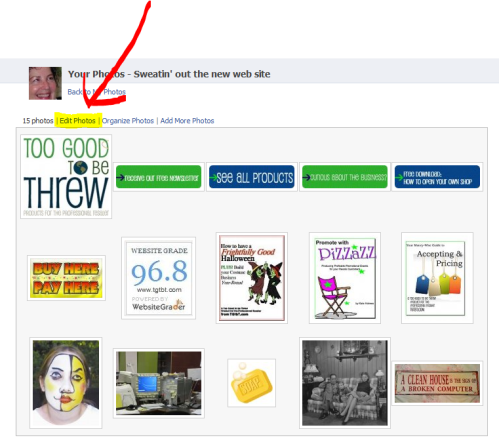
Start at your "home" at FB, click on profile, choose Photos tab, and pick an album. That brings you to a screen like this, where you choose "edit photos."

Here’s the screen you get. Notice that in addition to adding or editing captions, you can tag people, choose which photo is your “album cover”, you can also add or delete photos and even rearrange the order.

Lots of things you can change here. Don't forget to scroll down to the bottom of the page and click "save changes" when you're done. In fact, if you're as forgetful and prome to interruptions as I am, it's best to "save changes" early and often.
Okay, now you can write captions to your heart’s content. What could you say about a photo?
- Who’s in it.
- What’s going on in it.
- Why you want to show them this photo.
- And something to motivate them to come in, call, send the photo to a friend.
Okay, at this point I was going to pick a photo out of a consignment or resale shopkeeper’s album and use it as an example of what you could say. But I didn’t want to do it without permission, so let’s IMAGINE a photo instead. Say, a pair of designer shoes.
“Maribelle, with her new French pedicure, didn’t have to be begged to model these Donald Pliner thong sandals. The versatile saddle-brown color is perfect for late summer/early fall wear. We can just see a favorite customer tripping down Mott Street on her way to expresso-and-biscotti with that long-lost high-school love who’s just moved back in town. Only one of over 100 incredible shoes MyShop’s gotten in the last few days. If you haven’t been in recently, oh, what you’ve been missing! Long-lost love not included.”
Use your captions to paint a word picture…to arouse your readers’ imagination…to help them see themselves in that item. You can even use them to tell a story or lead your readers somewhere helpful.
Make your captions sound like what your customers would say/ think. Go ahead, try a few…then comment here, with a link to your new creations!


 Auntie Kate The Resale Expert
[…] captions count. And how to add them in Facebook, after the […]
[…] How to add captions to your FB pictures. […]
[…] forget captions. You know how I feel about captions. Like this and this and even […]
[…] Adding captions to photos already in your FB albums. […]
[…] Learn to add, and how to write, captions in your FB albums […]
[…] talked about captions being so useful for your business photos on the web. We’ve even talked about using words in your […]
[…] Show your customers in their finds. Snap a shot at the dressing rooms, or ask for a photo in use, like the mother-of-the-bride example below. Then start a photo album (“Dreams DO Come True”? ) on your business Facebook page, or a category on your blog (“They found it here!”? ), or a page on your web site (“Style is Beautiful the Second Time Around”?). Or collect a handful for every issue of your shop’s broadcast e-newsletter. Or heck, print ‘em out and post them on your community bulletin board in your entryway. Just don’t forget the captions! […]
[…] Putting words, in a witty way, into your merchandise photos is a great addition to those captions you’re now using. […]
Thanks Kate. I just uploaded pics from Florida and I’ll add some more captions and get some tagging done this weekend.
Molly
http://www.OnceAgainConsignment.com
http://www.facebook.com/OnceAgainRoswell
You are SO CLEAVER Auntie Kate….thanks for the inspiration tody!! (and every day)
Love your caption idea Kate! My FB page has been neglected lately since my camera phone got tanked. Now that it’s been replaced, I’m ready to add some new photos AND captions 😉
Thanks again!!