Posts Tagged ‘resale shopkeeping’
Traffic-stopping window display!
Posted in Shopkeeping talk, tagged advertising, display, resale shopkeeping on February 5, 2012| 1 Comment »
Thanks to Wet Seal for allowing me to photograph their window display.

What consignment, resale, & thrift shops can learn from…. gently-used old newspaper ads.
Posted in Shopkeeping talk, tagged advertising, learn a lot, resale shopkeeping, web on January 30, 2012|
When you’re starving for new creative ideas for your email marketing, a step into the past might be called for.
Definitely (more…)
Deja Vuesday: Is your resale shop boring your visitors?
Posted in 5- Minute Fixes, Shopkeeping talk, tagged advertising, resale shopkeeping, success, web, word of mouth on January 17, 2012|

Click the image for more Deja Vuesday posts that are too good to be threw from TGtbT.com
Your Good Luck Post for Friday the 13th.
Posted in Shopkeeping talk, tagged resale shopkeeping on January 13, 2012|
Happy Friday the 13th. I’m a great believer in making your own good luck, so today seems like a good day to talk about an inexpensive but sadly overlooked way to do so.
 Your good luck… that is, your attracting attention to your thrift, resale, or consignment shop… starts with (more…)

Edit your world
Posted in 5- Minute Fixes, Shopkeeping talk, tagged advertising, resale shopkeeping, web on January 12, 2012| 3 Comments »
Perhaps you’ve noticed the consignment, resale, thrift shop exterior photos on my Pinterest board called
Favorite Consignment, Resale, Thrift Shops
I’ve had a good time finding and posting all these for you.
I’ve had an even better time imagining how much more focused some of these photos could be without the extraneous stuff in them. After all, we can’t always change the real world… but with pixels, we can edit them!
Here’s an example. I’m using Photowipe which is free and easy, but I’m sure there are scads of other programs out there.

Nice photo, but the blue pavement painting distracts our attention from Vena’s shop, Selective Seconds in Indiana.
So I “erased” the handicapped signs (and the car to the left), just to focus on the shop. All I had to do was “draw” with my mouse over the areas I wished weren’t there. Result:
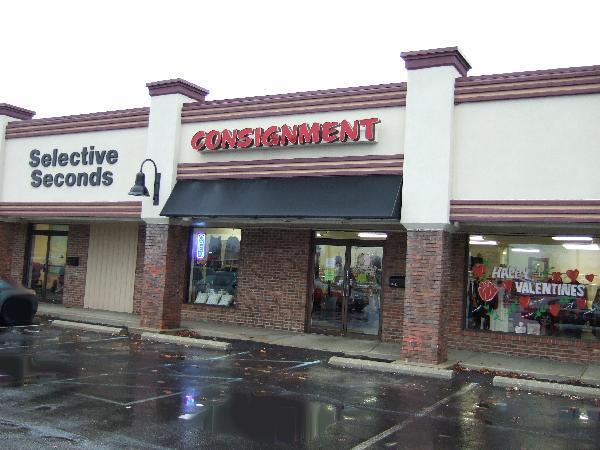
Neat, huh? And the pavement reflects the shop so nicely. If you really look, the “blotch” of the car is there, but who’s lookin’? We’re admiring the shopfront!
Now, I can get a little OCD. This is such a nice photo that I’d like to see it be usable year-round, so let’s downplay that Valentine’s Day lettering in the right-hand window. Erase, erase!

And it’s done! If you look carefully, the window display’s a bit blurry, but it’s still bright and colorful. Pretty good for an amateur, with a free program, in less than 5 minutes.
So if you have photos that are pretty good, but you’d like to erase some things from them, try Photowipe. Warning: Large ugly things like ex-spouses are not easily done away with, no matter how much we wish they were!
Now for a final tweak, let’s make sure this photo really motivates people to remember the shop. I take the final photo over to Picnik (you’ve heard me rave about this before) and add a little WIIFM to the picture.
UPDATE July 2012: Google bought and killed picnik.com (way to go, Google.), but an almost-identical program is now available at ribbet.com and there’s also picmonkey.com

This might be a little more than you’d really want to add to a photo, but I wanted to show you that you can have different colors, different sizes, even angled text. Total time, using Photowipe and Picnik, less than 10 minutes. Click the picture to go to the live link to Vena’s shop.
Sometime soon we’ll talk about all the resale, consignment, and thrift shops who don’t take the opportunity to put a photo of their shop on their site. Cryin’ shame.
Update August 2012: See WHY you NEED a photo of your shop on your web site, in our mini-series, Optimizing your web site for real shoppers.
The Blog of

Too Good to be Threw is the flagship site of the TGtbT Family of Sites for the Professional Resalers
-
Join 2,063 other subscribers
Let’s be Social
Meet Kate

What Kate said about:
When Kate said it:
Read more about:
accepting accessories advertising blogging buy-outright christmas competition consignment consignors customers daily operations display email employees Facebook Halloween holidays home decor HowToConsign.com learn a lot markdowns merchandising NARTS Conference perceived value Products for the Professional Resaler profit promotions resale shopkeeping sea of sameness selling shop local small business social networking starting a consignment shop success thought for the day Thrift Twitter web word of mouthMost Popular Posts
 Auntie Kate The Resale Expert